





Here is a comprehensive guide addressing the core questions, background context, practical solutions, and essential takeaways for printing high-impact business cards.
1. The Key Question & Common Issues
When professionals and business owners search for business cards printing solutions, they typically face three primary questions:
Quality vs. Cost: How can I get premium-looking cards without overspending?
Design & Specs: What dimensions, paper weights, and finishes actually make a card stand out?
Digital Integration: Should I stick to traditional paper, or should I integrate modern features like QR codes and NFC chips?
The ultimate goal is simple: How do I design and print a card that people actually keep, rather than throw away?
2. Context & Background: Why Print Cards Still Matter
In an era dominated by LinkedIn, virtual vCards, and social media, some assumed physical business cards would become obsolete. However, real-world networking proves otherwise.
The Psychology of Touch
A physical card creates a tactile connection during an interaction. Holding a thick, well-textured card leaves a lasting impression that a quick digital contact swap simply cannot replicate.
Speed and Reliability
Exchanging cards takes seconds and requires no internet connection, zero battery power, and no typing on small screens during fast-paced conferences or meetings.
Brand Identity Reflection
Your business card is often the first physical touchpoint a prospective client or partner has with your brand. Cheap paper or poor print quality signals a lack of attention to detail, whereas a meticulously crafted card communicates professionalism, trust, and quality.
3. Practical Solutions & Advice
To ensure your business cards make a powerful impression, consider these crucial printing factors:
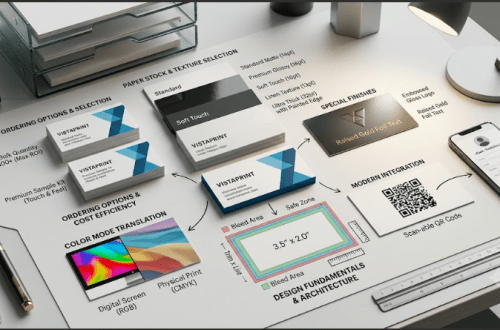
Step 1: Choose the Right Cardstock (Paper Weight)
Paper weight determines how sturdy your card feels.
14 pt stock (Standard): Decent for mass budget distribution, but can feel thin.
16 pt stock (Premium): The industry standard for a professional feel. Durable and rigid.
18 pt to 32 pt+ (Ultra-Thick/Triplex): Heavyweight cards that immediately convey luxury and high quality.
Step 2: Select the Best Finish
The finish dictates both the appearance and tactile feel of your print:
Matte: Smooth, non-reflective, and easy to write on with a pen.
Glossy: Vibrant and shiny; brings colors and photos to life.
Soft-Touch (Velvet): A rich, non-glossy coating that feels like suede. Excellent for a high-end experience.
Specialty Enhancements: Consider Foil Stamping (metallic accents) or Spot UV (raised glossy patterns over specific design elements) to highlight your logo.
Step 3: Optimize Design & Layout
Dimensions: Standard US dimensions are . In Europe, standard size is .
Bleed & Margins: Always set a bleed around your design to ensure edge-to-edge printing without white borders. Keep essential text at least inside the trim line.
Resolution: Ensure all graphics and logos are at least 300 DPI in CMYK color mode (not RGB) to prevent pixelation and color shifting during printing.
Step 4: Combine Physical & Digital
Bridge the gap between physical and digital networking by printing a dynamic QR code on the back of your card. This allows contacts to scan the card with their smartphone camera and immediately save your contact details or visit your portfolio website.
4. Conclusion
Investing in high-quality business cards printing is an investment in your personal brand and business credibility. By selecting a sturdy paper weight (16 pt or higher), pairing it with an elevated finish like soft-touch or spot UV, and ensuring correct print specs (300 DPI, CMYK), you transform a simple piece of paper into a powerful networking asset.